
Customer Management
Customer Management
Customer Import API
- URI
/wscrm-bus-api/customer/api/batchImport
- Request Method
POST , Content-Type : application/json
- Request Parameter Description
| Parameter Name | Type | Required | Remarks |
|---|---|---|---|
| tenantId | Long | Yes | Company id |
| data | List | Yes | Import data |
data Parameter Description
| Parameter Name | Type | Required | Remarks |
|---|---|---|---|
| agentAccount | String | Yes | Agent account |
| String | Yes | ||
| friendName | String | Backend setting | Name |
| sex | String | Backend setting | Gender: unknown, male, female |
| birthday | String | Backend setting | Birthday: 2020/03/08 (currently only this format is supported) |
| address | String | Backend setting | Address |
| String | Backend setting | ||
| profession | String | Backend setting | Profession |
| income | String | Backend setting | Income |
| desc | String | Backend setting | Remarks |
| tabName | Stirng | Backend setting | Tag names: Tag A, Tag B (separated by English commas) |
| cancelTabName | Stirng | No | Tags to remove; ignored when empty |
| stage | String | Backend setting | Customer stage |
| source | String | Backend setting | Customer source |
| languageTag | String | Backend setting | Customer language: Data from backend template sheet2, recognized by backend language settings For example:Simplified Chinese (ZH) / Chinese Simplified (EN) |
| welcome | String | No | Welcome message |
| ExtensionField | String | Backend config | See detailed explanation below |
- Request Example:
{
        "tenantId": 82,
        "data":[
            {
                "agentAccount": "kubrick101",
                "whatsApp": "8615266667780",
                "friendName": "Feng Changqing",
                "sex": "male",
                "birthday": "2020/03/08",
                "address": "Chang'an",
                "email": "fengchangqing@tang.com",
                "profession": "Military Governor",
                "income": "100 gold",
                "desc": "",
                "tabName": "Soldier,Strategy",
                "cancelTabName":"Strategy"
                "stage": "New customer",
                "source": "System assignment",
                "Faction": "Guanlong Group",
                "extensionField1": "This is the value of extensionField1",
                "languageTag": "Auto", // Customer language inferred by current logged-in agent account, optional
                "welcome": "This is a welcome message"
            }
        ]
}- Parameter Retrieval Method
agentAccount: Agent login account used to distinguish WhatsApp ownership by agent. Contact administrator to obtain.
- Extension Field Explanation
Based on backend customer settings: pass extension field name as key and extension field value as value,
For example:
Text:"ha-hi": "ha-ha-hi"
Number:"Numeric extension field": 123
Date:"Date extension field": "2022-03-08"
Time:"Time": "12:00:00"
Single select:"Single-select": "Single-select"
Multi select: "Multi-select": "A,B"
- Response Parameter Description
| Parameter Name | Type | Remarks |
|---|---|---|
| data | String | Data (excel) |
| msg | String | Error message |
| code | String | Returned status code (200、500、-1) -1 means parameter error |
data Parameter Description
| Parameter Name | Remarks |
|---|---|
| errExcel | Failed phone numbers and reasons |
| errCount | Failed count |
- Success Example
{
        "code": 200,
        "message": "Success",
        "data": {
            "successExcel": [],
            "errExcel": [],
            "successCount": 2,
            "errCount": 0,
            "notFollowSuccessCount": "",
            "notFollowSuccessExcels": []
        }
}- Error Example:
{
        "code": 200,
        "message": "Success",
        "data": {
            "successExcel": [],
            "errExcel": [
                {
                "errPhone": "",
                "errInfo": "PHONE_ERROR",
                "errCode": 28
                },
            ],
            "successCount": 0,
            "errCount": 2,
            "notFollowSuccessCount": "",
            "notFollowSuccessExcels": []
        }
}
Customer Import API (Into Import Pool)
Import Pool Notes
- Each API import overwrites previous data; different agents are isolated.
For example: First, two contacts were imported for agent Wang Wu(861821733142,861272562622)。Second, one more contact was imported for Wang Wu(861272562622) At this point Wang Wu only has (861272562622).
- URI
/wscrm-bus-api/customer/api/batchImportWhatsContact
- Request Method
POST , Content-Type : application/json
- Request Parameter Description
| Parameter Name | Type | Required | Remarks |
|---|---|---|---|
| tenantId | Long | Yes | Company id |
| data | List | Yes | Import data |
data Parameter Description
| Parameter Name | Type | Required | Remarks |
|---|---|---|---|
| agentAccount | String | Yes | Agent account |
| String | Yes | ||
| friendName | String | Backend setting | Name |
| sex | String | Backend setting | Gender: unknown, male, female |
| birthday | String | Backend setting | Birthday: 2020/03/08 (currently only this format is supported) |
| address | String | Backend setting | Address |
| String | Backend setting | ||
| profession | String | Backend setting | Profession |
| income | String | Backend setting | Income |
| desc | String | Backend setting | Remarks |
| tabName | String | Backend setting | Tag names: Tag A, Tag B (separated by English commas) |
| cancelTabName | Stirng | No | Tags to remove; ignored when empty |
| stage | String | Backend setting | Customer stage |
| source | String | Backend setting | Customer source |
| languageTag | String | Backend setting | Customer language: Data from backend template sheet2, recognized by backend language settings For example:Simplified Chinese (ZH) / Chinese Simplified (EN) |
| welcome | String | No | Welcome message |
| ExtensionField | String | Backend config | See detailed explanation below |
- Request Example:
{
        "tenantId": 82,
        "data":[
            {
                "agentAccount": "kubrick101",
                "whatsApp": "8615266667780",
                "friendName": "Li Heng",
                "sex": "male",
                "birthday": "2020/03/08",
                "address": "Chang'an",
                "email": "liheng@tang.com",
                "profession": "Emperor",
                "income": "10000 gold",
                "desc": "Emperor Suzong of Tang",
                "tabName": "Prince Zhong,Retake Two Capitals",
                "cancelTabName": "Prince Zhong",
                "stage": "New customer",
                "source": "System assignment",
                "Faction": "Royal Family",
                "extensionField1": "This is the value of extensionField1",
                "languageTag": "Auto", // Customer language inferred by current logged-in agent account, optional
                "welcome": "This is a welcome message"
            }
        ]
}- Parameter Retrieval Method
agentAccount: Agent login account used to distinguish WhatsApp ownership by agent. Contact administrator to obtain.
- Extension Field Explanation
Based on backend customer settings: pass extension field name as key and extension field value as value. For example:
Text: "ha-hi": "ha-ha-hi"
Number: "Numeric extension field": 123
Date: "Date extension field": "2022-03-08"
Time: "Time": "12:00:00"
Single select: "Single-select": "["Single-select"]"
Multi select: "Multi-select": "A,B"
- Response Parameter Description
| Parameter Name | Type | Remarks |
|---|---|---|
| data | String | Data (excel) |
| msg | String | Error message |
| code | String | Returned status code (200、500、-1) -1 means parameter error |
data Parameter Description
| Parameter Name | Remarks |
|---|---|
| errExcel | Failed phone numbers and reasons |
| errCount | Failed count |
- Success Example
{
        "code": 200,
        "message": "Success",
        "data": {
        "successExcel": [],
        "errExcel": [],
        "successCount": 2,
        "errCount": 0,
        "notFollowSuccessCount": "",
        "notFollowSuccessExcels": []
        }
}- Import succeeded. View it in PC client (Contacts - Import Pool).
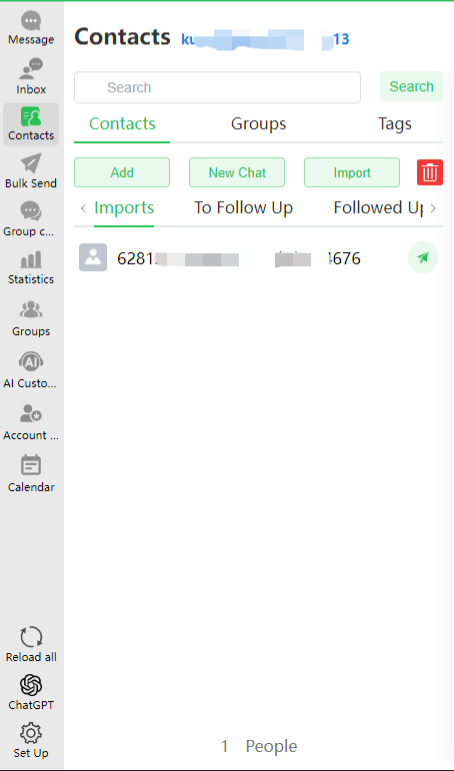
- Error Example:
{
        "code": 200,
        "message": "Success",
        "data": {
            "successExcel": [],
            "errExcel": [
                {
                    "errPhone": "",
                    "errInfo": "PHONE_ERROR",
                    "errCode": 28
                },
            ],
            "successCount": 0,
            "errCount": 2,
            "notFollowSuccessCount": "",
            "notFollowSuccessExcels": []
        }
}
Customer Import API (Append to Import Pool)
Import Pool Notes
- Each API import overwrites previous data; different agents are isolated.
For example: First, two contacts were imported for agent Wang Wu(861821733142,861272562622)。Second, one more contact was imported for Wang Wu(861272562623) At this point Wang Wu has three contacts (861821733142,861272562622,861272562623).
- URI
/wscrm-bus-api/customer/api/batchImportAppendV2
- Request Method
POST , Content-Type : application/json
- Request Parameter Description
| Parameter Name | Type | Required | Remarks |
|---|---|---|---|
| tenantId | Long | Yes | Company id |
| data | List | Yes | Import data |
data Parameter Description
| Parameter Name | Type | Required | Remarks |
|---|---|---|---|
| agentAccount | String | Yes | Agent account |
| String | Yes | ||
| friendName | String | Backend setting | Name |
| sex | String | Backend setting | Gender: unknown, male, female |
| birthday | String | Backend setting | Birthday: 2020/03/08 (currently only this format is supported) |
| address | String | Backend setting | Address |
| String | Backend setting | ||
| profession | String | Backend setting | Profession |
| income | String | Backend setting | Income |
| desc | String | Backend setting | Remarks |
| tabName | String | Backend setting | Tag names: Tag A, Tag B (separated by English commas) |
| stage | String | Backend setting | Customer stage |
| source | String | Backend setting | Customer source |
| languageTag | String | Backend setting | Customer language: Data from backend template sheet2, recognized by backend language settings For example:Simplified Chinese (ZH) / Chinese Simplified (EN) |
| welcome | String | No | Welcome message |
| ExtensionField | String | Backend config | See detailed explanation below |
- Request Example:
{
        "tenantId": 82,
        "data":[
            {
                "agentAccount": "kubrick101",
                "whatsApp": "8615266667780",
                "friendName": "Li Heng",
                "sex": "male",
                "birthday": "2020/03/08",
                "address": "Chang'an",
                "email": "liheng@tang.com",
                "profession": "Emperor",
                "income": "10000 gold",
                "desc": "Emperor Suzong of Tang",
                "tabName": "Prince Zhong,Retake Two Capitals",
                "stage": "New customer",
                "source": "System assignment",
                "Faction": "Royal Family",
                "extensionField1": "This is the value of extensionField1",
                "languageTag": "Auto", // Customer language inferred by current logged-in agent account, optional
                "welcome": "This is a welcome message"
            }
        ]
}- Parameter Retrieval Method
agentAccount: Agent login account used to distinguish WhatsApp ownership by agent. Contact administrator to obtain.
- Extension Field Explanation
Based on backend customer settings: pass extension field name as key and extension field value as value. For example:
Text: "ha-hi": "ha-ha-hi"
Number: "Numeric extension field": 123
Date: "Date extension field": "2022-03-08"
Time: "Time": "12:00:00"
Single select: "Single-select": "["Single-select"]"
Multi select: "Multi-select": "A,B"
- Response Parameter Description
| Parameter Name | Type | Remarks |
|---|---|---|
| data | String | Data (excel) |
| msg | String | Error message |
| code | String | Returned status code (200、500、-1) -1 means parameter error |
data Parameter Description
| Parameter Name | Remarks |
|---|---|
| errExcel | Failed phone numbers and reasons |
| errCount | Failed count |
- Success Example
{
        "code": 200,
        "message": "Success",
        "data": {
        "successExcel": [],
        "errExcel": [],
        "successCount": 2,
        "errCount": 0,
        "notFollowSuccessCount": "",
        "notFollowSuccessExcels": []
        }
}- Import succeeded. View it in PC client (Contacts - Import Pool).
- Error Example:
{
        "code": 200,
        "message": "Success",
        "data": {
            "successExcel": [],
            "errExcel": [
                {
                    "errPhone": "",
                    "errInfo": "PHONE_ERROR",
                    "errCode": 28
                },
            ],
            "successCount": 0,
            "errCount": 2,
            "notFollowSuccessCount": "",
            "notFollowSuccessExcels": []
        }
}
Query Friend Contact API
Description
Query friend contact list of the specified customer service account
URI
/wscrm-bus-api/open/customer/query
Request Method
POST、Content-Type: application/json
Request Parameter Description
| Parameter Name | Type | Required | Remarks |
|---|---|---|---|
| whatsId | String | Yes | Customer service account |
Request Example:
{
  "tenantId": 520274,
  "whatsId": "86187272722"
}
Response Parameter Description
Parameter Name Type Example Remarks code int 200 Status code message String Success Description data String List Data
- data Parameter Description
| Parameter Name | Type | Remarks |
|---|---|---|
| whatsId | String | whatsId |
| name | String | User name |
| sex | String | Gender |
| String | ||
| birthday | String | Birthday |
| address | String | Address |
| profession | String | Profession |
| income | String | Income |
| desc | String | Description |
| country | String | Country |
| stage | int | Stage (configured in backend) |
| source | int | Source (configured in backend) |
| tabList | List | Tag list, may include string arrays |
| firstChatTime | String | First chat time |
| lastChatTime | String | Last chat time |
| extendMap | Object | Extension field with key-value pairs; exact type depends on internal field config |
- Response Example
{
  "code": 200,
  "message": "Success",
  "data": [
    {
      "whatsId": "86187272722",
      "name": "",
      "sex": null,
      "email": "",
      "birthday": null,
      "address": "",
      "profession": "",
      "income": "",
      "desc": "",
      "country": null,
      "stage": 10,
      "source": 10,
      "tabList": null,
      "firstChatTime": null,
      "lastChatTime": null,
      "extendMap": {
        "Date": "2024/07/08"
      }
    }
  ]
}
Async Notification for Customer Profile Update
Description: PC-side customer profile updates (basic info and extension fields)
WebHook
Configuration ID <USER_SYNC_PORTRAIT>
Request Parameters
Parameter Name Type Required Remarks accessToken String Yes Signature token tenantId int Yes Company id timestamp Long Yes Millisecond timestamp data List Yes Format: [{},{}], details below (0-50 items) - data Detailed Parameters:
Parameter Name Type Required Remarks id String Yes Data id identifier (uuid) userName String Yes Agent login account type int Yes Type: 1 profile update, 2 write follow-up friendWhatsId String Yes Target customer service account field String Yes Updated field item; extension field uses field name, e.g. ext-Attachment fieldType int Yes Field type: 0 basic field, 1 extension field fieldConfig int Yes Field config: 1 single-line text, 2 multi-line text, 3 single-select, 4 multi-select, 5 number, 6 date, 7 time, 8 attachment sourceValue String No Original value targetValue String No Updated value updateAt String Yes Update time - Example request parameters:
{
  "accessToken": "83293d01dddd628e3b457142f8a48a0cf4dae3b587e7febea7effea6bdcfd344",
  "tenantId": 500975,
  "timestamp": 1667293135274,
  "data": [
    {
      "id": "a0cb1ad15ed24e618b4b12d9cdff1ad4",
      "type": 1,
      "userName": "Zhang San",
      "friendWhatsId": "8615601882491",
      "field": "Address",
      "fieldType": 0,
      "fieldConfig": 1,
      "sourceValue": "",
      "targetValue": "123123",
      "updateAt": "2022-09-29 20:34:58"
    },
    {
      "id": "81c968134be648e19187db83efa60152",
      "type": 1,
      "userName": "Zhang San",
      "friendWhatsId": "8615601882491",
      "field": "Gender",
      "fieldType": 0,
      "fieldConfig": 3,
      "sourceValue": "MALE",
      "targetValue": "FEMALE",
      "updateAt": "2022-10-02 20:34:58"
    },
    {
      "id": "4d8ac8a3a5164ab2b066dcf8fac5bd45",
      "type": 2,
      "userName": "Zhang San",
      "friendWhatsId": "33758618170",
      "field": "Follow up records",
      "fieldType": 0,
      "fieldConfig": 1,
      "sourceValue": "",
      "targetValue": "{\"data\":{\"text\":\"Hello\",\"url\":[]},\"dataTypeMap\":{\"writeFollow\":\"Write follow-up\"}}",
      "updateAt": "2022-10-31 17:44:06"
    }
  ]
}
Follow up records:
fieldType、fieldConfig、fieldType are initial values
Write follow-up sourceValue、 targetValue uses fixed format data: data(text: follow-up text, url: uploaded file URLs), dataTypeMap(value fixed format) type
field Description
fieldConfig indicates our value type mapping; optional and not mandatory field
| field | fieldConfig | Description(sourceValue ->targetValue) |
|---|---|---|
| Name(Name) | Single-line text | String, e.g.:Xiaoming ->Xiaowang |
| Gender(Gender) | Single-select | String allowed values(MALE、FEMALE、UNKOWNN) e.g.:MALE -> FEMALE |
| DOB(Birthday) | Date | String format(yyyy-MM-dd) e.g.:2022-12-01-> 2022-12-02 |
| Address(Address) | Single-line text | String, e.g.:Shanghai-> Beijing |
| Email(Email) | Single-line text | String, e.g.: 123@qq.com-> 123@163.com |
| Position(Profession) | Single-line text | String, e.g.: Operations->Sales |
| Income(Income) | Single-line text | String, e.g.: 10k -> 20k |
| Description(Remarks) | Multi-line text | String (with line breaks \n) e.g.: 1\n2\n3 -> 1\n2\n3\n4 |
| From(Customer source) | Single-select | String according to backend customer settings e.g.:Default -> Self-developed |
| State | Single-select | String according to backend customer settings e.g.:New customer -> Requirement match |
| Language(Customer language) | Single-select | String according to backend customer settings e.g.:auto -> am |
| Tags | Multi-select | String array according to backend customer settings e.g.:[Tag 1] -> [Tag 1,Tag 2] |
| Multi-select(extension field custom name) | Multi-select | String array according to backend customer settings e.g.:[Multi-select 1] -> [Multi-select 1,Multi-select 2] |
| Time(extension field custom name) | Time | String format(HH:mm:ss) e.g.:17:26:59-> 17:27:35 |
| Attachment(extension field custom name) | Attachment | String format(,http separated) e.g.:http://123.img,http://456.img |
Return Value
Parameter Name Type Required Remarks code int Yes Status code message String Yes Description data String Yes Data - Example:
{
  "code": 200,
  "message": "",
  "data": ""
}
Follow-up Sync
Note: interface encryption rule uses headers.
Type:<USER_WRITE_FLOW>
WebHook
Request Method
POST、Content-Type: application/json
Request Parameter Description
| Field | Type | Required | Remarks |
|---|---|---|---|
| accessToken | string | Yes | token |
| timestamp | long | Yes | Timestamp |
| tenantId | int | Yes | Company id |
| data | array | Yes | Detailed follow-up data |
- data Parameter Description
| Field | Type | Required | Remarks |
|---|---|---|---|
| friendWhatsId | String | Yes | Target WhatsApp phone number |
| userId | int | Yes | Current agent id |
| tenantId | int | Yes | Company id |
| follow | String | Yes | Follow-up content |
| username | int | Yes | Follow-up agent account |
- Request Example
{
  "accessToken": "e6e18763d8d5a756d45c01486d7ad6742152ac",
  "callBackUrl": "",
  "tenantId": 82,
  "timestamp": 1667295870936,
  "data": [
    {
      "friendWhatsId": "8617633819542",
      "userId": 1221,
      "tenantId": 22,
      "follow": "{\"data\":{\"text\":\"Beautiful China\",\"url\":[]}",
      "username": "gavin"
    },
    {
      "friendWhatsId": "8617633819542",
      "userId": 1221,
      "tenantId": 222,
      "follow": "{\"data\":{\"text\":\"Beautiful China\",\"url\":[]}",
      "username": "gavin"
    }
  ]
}- Response Example
{
  "code": 200,
  "message": "Success",
  "data": ""
}
Customer Field Information
To obtain available basic fields, extension fields, and tag information, log in to admin backend to add or modify.
- Basic Information & Extension Fields
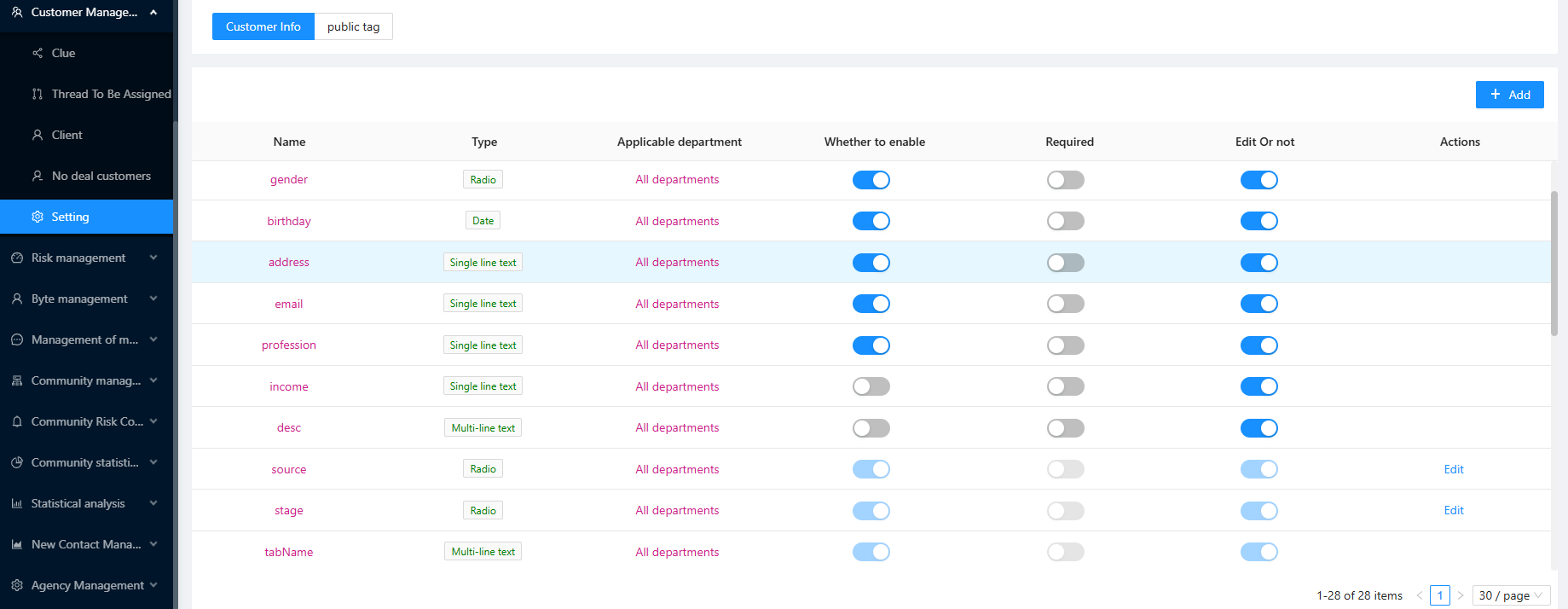
- Tag Information
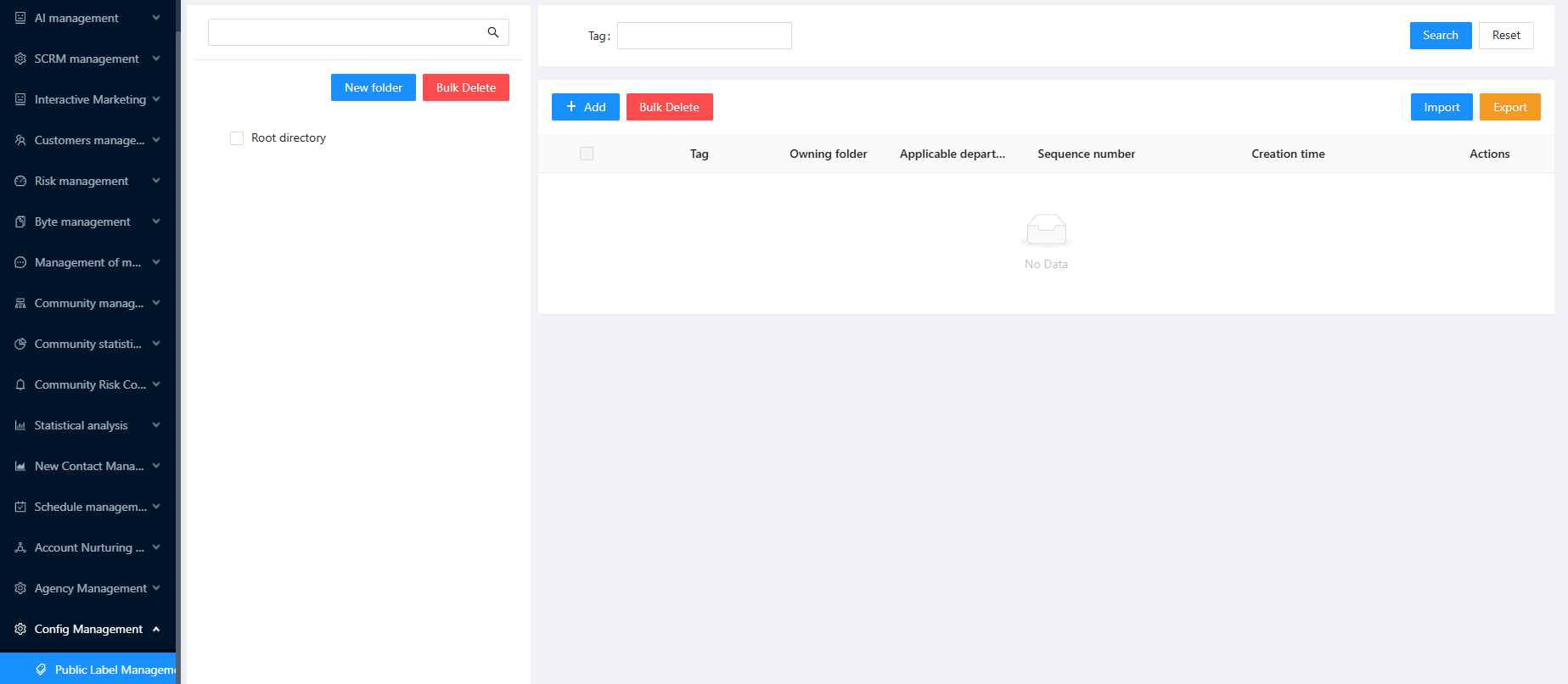
- You can log in to client to verify effectiveness.
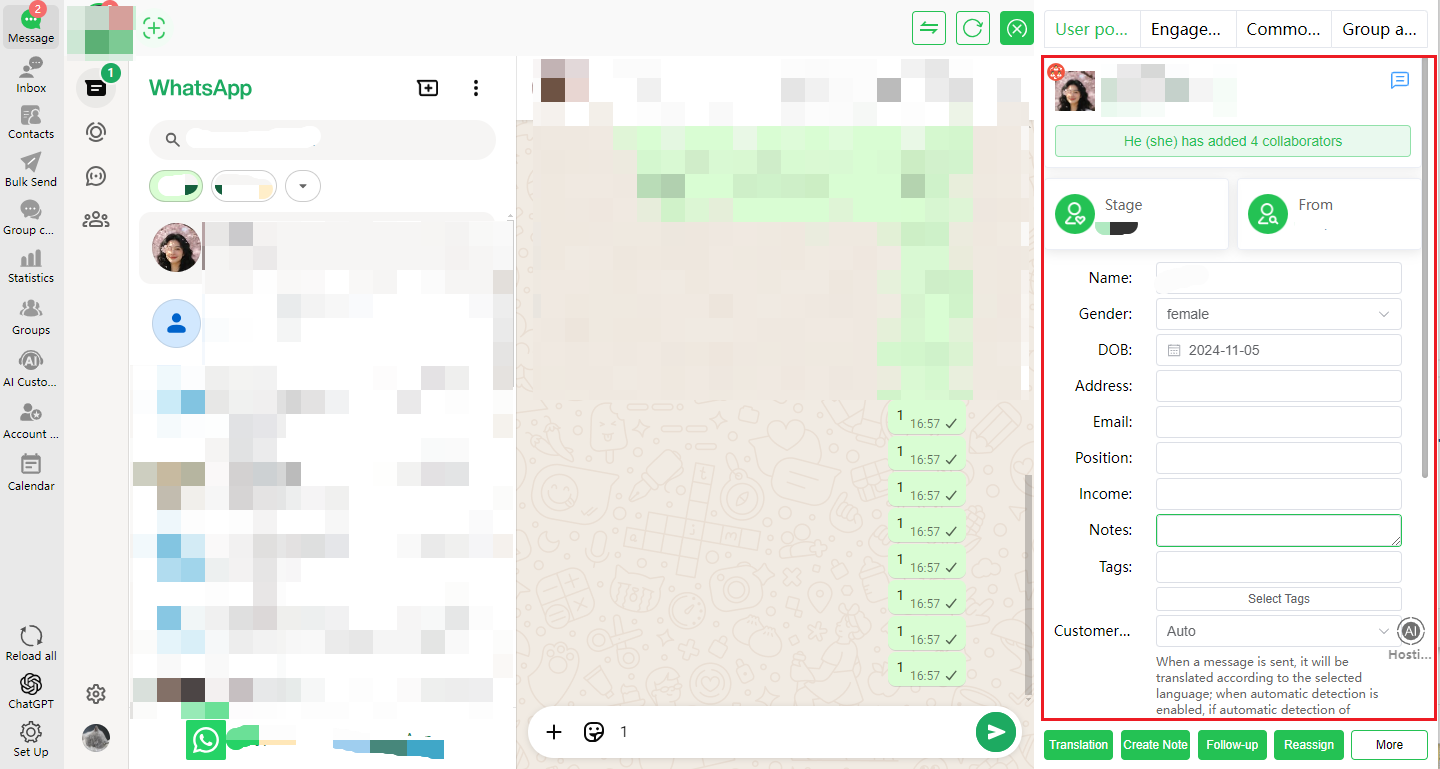
- Error Codes
| Code | Description | Interpretation |
|---|---|---|
| -1 | token error / TenantId Is Null / Admin Cannot import data / Data Is Null | Company/account basic information |
| 10 | Gender field sex format is invalid | sex field format error |
| 14 | Source field value does not exist | source content does not meet requirements |
| 15 | Stage field value does not exist | stage content does not meet requirements |
| 16 | Customer language value does not exist | languageTag value does not exist |
| 19 | Exceeded 10,000 record limit | Exceeded 10,000 record limit |
| 21 | Extension field content exceeds length | Extension field content exceeds specified length |
| 22 | Required field validation failed | Required field not filled |
| 23 | Extension field - number type format error | Not a valid numeric type |
| 24 | Extension field - date type format error / birthday field type format error | yyyy/MM/dd |
| 25 | Extension field - time type format error | HH:mm:ss |
| 26 | Extension field - single-select type format error | Selected multiple options or option no longer exists |
| 27 | Extension field - multi-select type format error | Selected option no longer exists |
| 28 | Phone number error | Not numeric |
| 29 | Phone number is empty | whatsApp is empty |
| 51 | Country field does not exist | Country field is empty |
| 56 | friendWhatsId data is processing | friendWhatsId is processing (one-minute interval) |
| 58 | Extension field - attachment url too long | Number of URLs exceeds 10 |
| 59 | Extension field - invalid attachment URL or network fluctuation or oversized file | Invalid URL or network fluctuation or oversized file |
| 60 | Extension field - attachment file too large | Contains oversized attachment information |